















Source Local

How To Find New Fans AND Make Social Media Updates Easy

By NationWide Source Estimated reading time: 5 minutes

Everyone wants to make their life a little easier. Especially independent musicians. From being the artist to the tour manager to the PR specialist, indie artists have a lot on their plates. So when we find a tool that frees up a little of your time and does its job well, we get excited.

Enter Bandsintown.

Bandsintown is a website and app that lets music fans track their favorite artists. Then it lets those fans know when the artists they tracked comes to town. 65% of all touring artists in the United States use Bandsintown, and they have over 120 million fans subscribed to their service. For the artist, it’s an easy tool to use. Bandsintown adds a “Tour Dates” tab to your Facebook page, and you can manage everything from there. It’s a simple concept that has some great features. So let’s dive into why Bandsintown might be a good tool for your band.

Social Media Updates

A few weeks ago we posted a blog about ReverbNation, and it warned against letting third parties automatically post concert updates to Facebook for you. We cautioned against using this feature on ReverbNation primarily because there was no way to control these posts, besides turning them on and off. They tended to fill up artist’s Facebook and Twitter with duplicate content that had the potential to drive fans away.

This is not the case with Bandsintown. Their automatic posting feature has tons of options that let you control exactly what is posted.

If you choose to turn these posts on in Facebook, you can also target them geographically. This a great feature. It makes sure you’re not bothering all your West Coast fans with your extensive touring in the Northeast.

Post to Reginal

It’s also notable that the “Tour Dates” tab allows you to upload a custom video header. This is great news, because it allows your fans to engage with visual content before they browse your tour schedule. It’s been shown that visual content (graphics and video) tend to create higher response rates with viewers, so having this built into the page where your shows are displayed is a great feature.

Screen Shot 2015-07-13 at 11.55.56 AM

Fan Analytics

Fans are the lifeblood of any musician. And having data about those fans can mean the difference between a successful tour or playing to empty rooms every night. If you have over 100 trackers (fans) in Bandsintown, you can receive fan analytics.

Probably the best feature in these analytics is the fan heat map. This tool allows you to see where the fans that track you live, where fans who track similar artists live, and the locations of fans who have RSVP’d to your shows. This helps you to create a tour schedule that will have the most impact for you.

Heatmap

They also create a list of the top 100 markets for your live show based on the number of trackers in each city, and show you a graph of actual RSVPs for your shows vs. people who are interested in attending.

RSVP vs. Interested

Google Loves Bandsintown

Bandsintown has a nice looking widget that you can embed onto your official website to display your tour dates. This is handy because you only have to upload your show dates once and they will be live on your official website and social media.

Another bonus is that Bandsintown has partnered with Google to streamline the ways that events show up when you search for a band. Since Bandsintown and Google are buddies, all your show information is easy for Google to read, and shows up clearly.

Screen Shot 2015-07-13 at 2.08.05 PM

Another benefit to Bandsintown’s relationship with Google is YouTube Cards. YouTube hopes to replace annotations in videos with small rectangular boxes called cards. These cards are small pictures with text, and will display on desktop as well as mobile browsers. You can link these cards to your official website if you’ve already affiliated your YouTube channel with your website. However, if you want to use YouTube cards to sell anything, you have to use a retailer that has already been approved by YouTube. The good news is that Bandsintown is on that list.

Hozier YouTube

But the best news about this feature?

When you use Bandsintown on your YouTube card, the card will link directly back to your website.

This is great news for artists, and is vastly different than many third party applications that will take your fans to their website instead of your own.

What Not to Do With Bandsintown

Just like any other online tool, there are some things you need to be careful of when using a third party app to help you out.

  • Don’t let Bandsintown social media posts take over your profile.  Just because the social media posting feature works well doesn’t mean it is a replacement for actual posts created by you. Even though Bandsintown gives you lots of posting customization options, if all your fans ever see are these posts, they will probably check out pretty quickly. You can read our blog for tips on managing your social media profiles here.
  • Don’t let Bandsintown gather all your fan data for you. Although they have some great analytical tools, you don’t ever want a third party to be the main way you gather information about fans. If third parties are the only way you’re collecting fan data, if they ever shut their doors, you will be left high and dry with no way to communicate with fans.
  • Don’t Let Bandsintown Emails Replace Your Regular Newsletters. It’s great that Bandsintown will automatically send your fans an update when you’re playing in their area, but a personal newsletter written by you is a better way to engage with fans. Many email newsletter services also allow you to geographically target your email audience. Using Bandsintown and your favorite e-newsletter platform in conjunction with each other can optimize your fan interaction, and help get those fans out to your shows.

Overall, Bandsintown is a well built, professional tool that can help artists manage the planning and promotion of their shows, and I would recommend it to almost any artist. But as always, do some experimenting and find out if this app is something that will work for you and your music. If you want more information, you can check out Bandsintown’s official website here.

Have you used Bandsintown? What are your favorite features? Has it helped you to plan more effective tours, and get fans out to shows? Let us know in the comments below!


...Keep Reading

How to Add Your Music to Gracenote in 5 Easy Steps

By NationWide Source Estimated reading time: 3 minutes

Here’s the scenario: Your fan just bought a CD at a show. They are so excited to listen to it that they immediately take it out of the package and put it into the CD player in their car. After having it in their car for a few weeks, they finally decide to take it inside and add your music to their iTunes library. They put the CD into their computer, and iTunes pops up to import it. But no track or artist information is listed.  Unfortunately, they left the CD packaging in the car and don’t remember all the titles to your songs. They still import it, but your music gets moved down to the bottom of the their music library, with no way to distinguish it from all the other annoying untitled tracks.

This is a problem that can be easily solved. Gracenote is a music recognition service that is employed by many major music retailers and other music services to provide metadata about music files.

Metadata is data about other data. It seems complicated, but actually it’s pretty simple. If you have an mp3 file (the original data), the metadata (data about the original data) might include the artist name, track name, album name, genre, or even the album artwork.

It’s important to have this metadata attached to your files so that you music can be recognized easily, and Gracenote is the most widely used way to make this data available.

Getting Your Music To Gracenote

The great thing about Gracenote is that it is really simple. There are two ways to add your music to their database.

Digital Distribution

If you are distributing your music digitally, Gracenote might be included in your distribution pack. This is the most convenient way to upload your metadata, because your distributor already has all the information.

Major online distributors like TuneCore, and CD Baby (Gracenote is included in their Mega Distribution bundle) will add your metadata information when you upload your files. As long as you entered all the information correctly when you submitted your music, all your metadata information will be correct.

Manually Entering Information

If you are not using an aggregator that automatically uploads metadata to Gracenote, don’t worry. Entering your metadata is an incredibly easy process.

Step One: Simply put your CD into your computer, or upload an mp3 into your iTunes library. However, if you just upload an mp3, make sure it is a finished—hopefully mastered—product, because Gracenote uses the duration of your songs to recognize them in iTunes.Screen Shot 2015-07-10 at 11.33.47 AM

Step Two: Gracenote might show you a fuzzy matches dialog box of albums that could be matches. Close this box if it pops up.

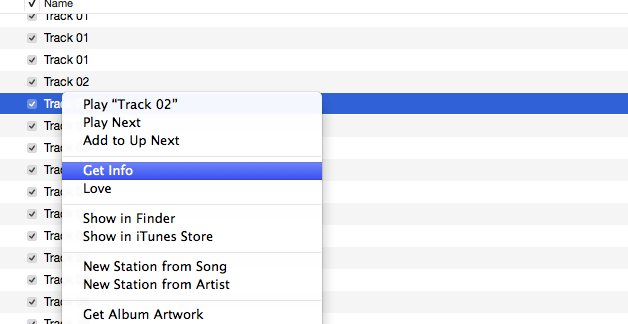
Step Three: Right click on one of the track names and choose the option “Get Info.”Get Info

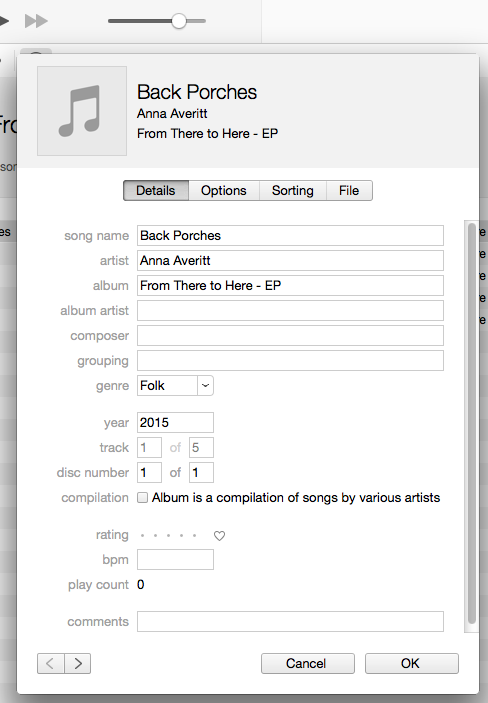
Step Four: Enter all the information for each song exactly as you want the metadata to appear. Screen Shot 2015-07-10 at 10.59.02 AM

Step Five: If you are using the latest version of iTunes, there will be a button on the right that says “Options.” Click this button and choose  “Submit CD Track Names…”Screen Shot 2015-07-10 at 10.56.24 AM

A dialog box to choose a genre will pop up if the genre you have currently selected is not supported by Gracenote.

Screen Shot 2015-07-10 at 11.00.10 AM

Click the submit button, wait 2-3 days and then insert your CD again. Your metadata will either be automatically entered, or you will choose from a list of albums that exactly match the duration of each of your songs. Mine only had one other exact match, so it was easy for me (and my fans!) to find the correct information.Screen Shot 2015-07-10 at 11.00.34 AM

If you have any more questions, or your metadata hasn’t appeared after a few days, you can visit Gracenote’s official site to get some help.


...Keep Reading

Musicians and Social Media- How to Market Your Music Like a Pro

By NationWide Source Estimated reading time: 5 minutes

It’s a struggle almost all artists face. You need social media to market your music, but it keeps eating up all your time. Or you’re so fed up with updating all your profiles that you hardly ever post. Both of these problems can be helped by one thing.

A plan.

But not just any plan. You need a plan to make your social media profiles engaging to fans, and you need to spend less time doing it.

Creating a Social Media Plan

  • Step One: Decide what you want from your social media profiles. Do you want to create more personal interaction with fans? Do you want to drive sales of your album or traffic to your website? Having an end goal gives your social media profiles purpose, and keeps them from being useless time-eaters.
  • Step Two: Determine where your audience is, and how they want you to communicate with them. Meeting your fans where they are will help you engage better. If I know the majority of my fan base is on Twitter, then I should probably put a little more effort into Twitter. This doesn’t mean you ignore your other social profiles, it just means that you spend the most time on the sites that are going to help you meet your goals. For more information on that topic, you can read this blog.
  • Step Three: Take a look at your social media profiles. Briefly analyze how you use them. You probably already know off the top of your head which ones need the most work, and which ones you are already keeping updated well. This is also a good time to make sure that on each network you have filled out your profile completely, and that the information is current.
  • Step Four: Write down your plan. Put down what you think is going great, and what could use work. Write down the social network where your target audience is spending the most time. Then write down three goals to focus on this month.

Here is an example of a simple social media plan that took me about 10 minutes to create:

socialmediaplan

Creating Good Content

Great content is the key to a solid social media presence. Musicians usually have more content than they realize. Your original songs, the stories you tell between songs, the merch you sell, and even interacting with fans after a show can all become good content. You just have to convert it to something that fans can see on the internet.

Creating good content doesn’t have to be difficult, but it can be a little time consuming. Try to set aside a few extra hours at the beginning of the month to create some of the content you will be using that month. Record a couple videos of covers you’ve been playing, or work on creating some graphics to share. You can use these things as backup content for days that you may not have anything else going on. After you’ve created your backup content, you can look for everyday things that enhance your brand and use them as content!  Pictures with fans, or a live video are great things to post, and you’re probably already doing half the work needed to turn them into great content.

Deciding What To Post

When creating content, remember the numbers 10  7  2  1.

Out of 10 posts on social media:

  • 7 posts should be content that builds your brand
  • 2 posts should be shared from other brands that are relevant to your own
  • 1 post should be self-promotional.

Brand Content

These are the things that make you who you are, and your music what it is. These posts help people see you, or your band’s, personality. This can be a funny picture, a behind the scenes video, a tour story, or a music video. Basically anything that shows off who you are. Posts promoting shows can even fall under the brand content category if they are done creatively.

Shared Posts

Building community is important. Sharing posts from other bands, or giving a shoutout to a local company can be a good way for you to make connections, and it lets your fans know that you are looking out for them by recommending things you’ll think they’ll like. If a band you’ve played with in the past is playing a big festival, give them a shout out! If your favorite local cupcake maker just gave you a fantastic cupcake, let your fans know.

Self Promotion

This is your place to shamelessly ask people to buy your stuff. If you’re already posting other things that they are interested in, your fans won’t mind when you ask them to buy your album, or get the new t-shirt you just designed.

Put Your Content into Action

Now that you know what your plan is, and you know what your content should look like, you have to get out there and actually post.  Having a posting calendar can be a great tool to keep you accountable and help take the guesswork out of posting. You can be as general or as broad with this calendar as you like. I recommend scheduling at least 10 posts every two weeks.

Here’s an example I’ve created of what a simple posting calendar can look like. This took me about 15 minutes to create.

postingscedule

Building a great social media presence takes hard work. But with a good plan, you can give your followers the content they want without spending all of your free time on social media.

Have any other great social media marketing tips? What’s worked best for your band? Let us know in the comments below!


...Keep Reading

How To Spend Less Money Recording An Album – Part 2

By NationWide Source Estimated reading time: 7 minutes

This is the second article in the “Spend Less Money” series. To read part one, click here.


If you asked a professional sound engineer or studio manager what the number one way to save money in the studio is, they will probably tell you to come prepared. When time is wasted, the dollars begin to add up quickly. So how do you prepare well? We will be addressing this issue in our next few blogs, and today we start out with something you might have overlooked as you began studio prep.

Demos.

I know you’ve heard it before. Demos—from a simple recording on your smartphone, to a fully produced track—are an important step in the songwriting process. If you are hoping to pitch your song to another artist, a professional demo could help you get those placements.

But the demos we are talking about function a little differently. These are your pre-production demos. They are for you (and your band) to get to know your music better before you hit the studio. They are for tweaking the songs until you get them just right, and they give studio musicians or your band something to rehearse to. If done well, they can even function as a scratch track in the studio, saving you time and money as you begin the tracking process.

Creating Your Demo

In many situations, a simple recording on a smartphone will suffice for a demo. But to use pre-production demos to their full potential, you are going to have to go one step further.

Your demos don’t have to be so fantastic that you don’t actually need to go into the studio after they’re finished. But there are a few key elements that you will need to be able to control as you create your pre-production demos.

You will need a Digital Audio Workstation that will allow you to have control over tempo, and allow you to use a MIDI keyboard or controller. There are many different kinds of DAWs at all different price points. You just need to find one that you are comfortable using. If you already have a more advanced DAW like Protools, use that. Audacity is a free DAW, and Garageband comes pre-loaded on most Macs.

If you are able, I also recommend purchasing a simple USB interface, like this one. This will allow you to hook up a MIDI Keyboard, as well as plug in your guitar and favorite microphone. However, you don’t have to. Most Macs and PCs have built in audio recording devices, and Garageband will allow you to input MIDI using your computer’s keyboard. Although it may be easier in the long run to purchase a USB interface, you can still create a useful pre-production demo for free.

Tempo

The exact tempo of the music can drastically alter the feel of a song. Even just a few beats per minute (BPM) up or down can have a huge impact. Before you record your demo, rehearse the songs with a click track. If you’ve never used a click track before, this can be a big adjustment. However, playing to a click track is vital for studio work. The better you are at staying locked into the click, the smoother your recording process will be.

As you are rehearsing, try changing the BPM of the click, and playing the song at new tempos. You may find your song works really well as a ballad instead of the mid-tempo rock song you thought it was.

When you find a tempo you think works, create a click track in your DAW and record a simple track, guitar or keyboard and probably vocals. Have other people listen to the song. Have your guitar player or drummer play along with it. If they think it’s too fast or too slow, play around with it. If you record MIDI (Musical Instrument Digital Interface) keys as your basic track, it will be easy to adjust them to a new tempo without re-recording. If you recorded acoustic guitar, you may need to re-record. That’s okay. Better to spend a little time up front on these demos than to discover halfway through tracking in an expensive studio that the song is too slow.

Key

As you are playing through a song, you may discover that the key you wrote the song in is not the best key to record the song in. The ability and range of the primary vocalist is the biggest determining factor when choosing a key. You need to make sure your vocalist is comfortable, and can achieve the sound you want in the key the song is written in.

It’s also important to remember that different instruments work best in certain keys. If you know you want to feature brass heavily on a song, it’s best not to record that song in a key with 7 sharps. Brass players usually feel more comfortable in flatted keys, string players feel better in sharped keys. Keeping your instrumentation in mind while you’re choosing a key can help you get a great finished song.

Production

Pre-production demos are also a great place to work out auxiliary parts for your songs. Once you determine the tempo and key, you can use your MIDI keyboard to do some experimentation. If you think that a song needs strings, try adding a string part with a virtual instrument. Doing some of your production this way will allow you to communicate better with session players, a producer, or a sound engineer.

This is also a good time to get your lead guitarist to nail down his solo. While you should allow for creativity to happen when you’re actually tracking, having a plan and knowing exactly what parts you want for each song will make your life easier when it comes time to actually record.

Save Time, Save Money

The biggest reason that pre-production demos are important is their role in saving you time and money as you prepare to lay down tracks. This is true whether you use a home studio, or a professional studio. Pre-production demos allow you to tweak your songs easily, let you play around with sounds, tempos, and meters, and let you know exactly how the songs is going to be structured. That way when it’s time to record, you have a clear picture of what you want. This can be especially helpful if you are in a band and want multiple band members to have input on the overall direction of a song, but don’t want to spend time discussing it in the studio. Regardless of where you are recording, saving time means saving money and pre-production demos allow you to be prepared.

Listen, Listen, and Listen Some More

In addition to allowing you to experiment with your songs, pre-production demos can help with the song selection process, and deciding the order of songs in your project. Although you might already have a good idea of what you want, these demos can help you iron out the rough patches. Listening to the pre-production demos—and allowing other people to hear them—can give you a good idea of what songs are actually good enough to make it on the album. After you have a good idea of what your best songs are, you can begin to listen to them in the order you think they belong in. This allows you to listen for any odd transitions between songs. Pay special attention to what keys your songs are in at this phase. Transitions between keys can greatly affect the mood of your album.

You should also listen to how tempos are grouped. If too many slow songs are together, the album may drag. If too many high energy songs are paired with each other, the audience may get bored. A good way to combat this problem is to have a non-musical friend give you their opinion. Though they might not know exactly what is going on musically, they will be able to listen objectively and point out some issues you may have missed. Listening through your pre-production demos can help you solve these potential problems before you ever get into the studio.

The great thing about pre-production demos is that they are unfinished. Their point is to be a continual work in progress. Let yourself have the freedom to experiment and tweak them. If you use your demos well, you can have better communication between band members, producers, engineers, and session players. They can also help you to achieve a better finished product for less money.

Have any questions or tips on creating demos? Any advice on saving money when you record an album? Let us know in the comments below!


...Keep Reading
How to Spend Less Money Recording an Album

By NationWide Source Estimated reading time: 8 minutes

So you’ve decided it’s time to make an album. You’ve been playing these songs live, you’ve recorded the demos, and people keep asking, “When is your album coming out?”  You can’t wait to get these songs tracked and you’re ready to see all the music inside your head coming to life.

And then you figure out how much it’s going to cost.

Recording an album can get expensive. But it doesn’t have to break the bank. You don’t have have to drop $10,000 to get a great record, if you go into the process prepared. Knowing up front what  is important to you can help you decide what you want to spend money on, and what you can skip to make the process cheaper.

So lets look at some things that will drastically affect the cost of your record, and how to drive those costs down.

Length of the Project

The length of the project will drastically affect your cost. 12 songs are more expensive to record than 3 songs.

You have to be honest with yourself—and your other band members—about what songs are good enough to go on an album. Make sure that your investment of time and money is funding great songs. You want to make an album that you are going to be proud of for years to come.

Do People Actually Want a Full-Length Album?

As you make decisions about your upcoming project, you need to look at the music industry as a whole. For the past 15 years, we have seen album sales drop, and sales of singles rise. When you create an album of any size, you invest time, money, and a lot of emotions. You need to be able to get a return on your investment. Sometimes, recording a full length album is a great idea. Creatively, getting to spread your wings and work on 12 songs can be a wonderful thing that fulfills you as an artist. If you have the time and money to record a full album and that’s what you want to do, then go for it. But for many artists, recording a smaller body of work now can result in a better return on your investment later.

If you have four really great songs that people absolutely love, and seven songs that are just okay. Just record those four songs. You’ll cut your cost drastically, and you’ll be giving fans the music they truly love.

Producers

You also have to decide whether or not to work with a producer.  Producers have been a part of recorded music since its inception, and they are an important part of the recording process. If you have a particular sound in mind, finding a producer who specializes in your genre can be a great way to make sure your music is comparable to what is currently available. Working with a great producer can also bring a valuable outside opinion on the music you will be recording.

A producer can be one of the most expensive parts of your album. But a great producer who understands you and your music can take your album to new heights. Some artists love working with a producer, while other musicians prefer to do it all themselves. You have to decide what’s right for your music. If you have found a producer you trust, and can afford them, I recommend you hire one.

Often producers and sound engineers are the same person, especially for smaller projects. This can help you cut costs while still reaping the benefits of having a producer.

Studio or At Home

At home recordings and DIY studios have come leaps and bounds in the past few years. It’s now possible to make a great sounding record at home. However, there are still costs associated with this. The equipment needed to build a professional sounding at-home studio is still quite expensive. If you don’t already have the tools you need at home, you may find your initial budget gets eaten up quickly on equipment alone.

If you are a beginner in home recording, even though your initial investment in equipment may be higher, you could save money in the future if you already have all the tools needed to make great music in your living room.

There are lots of great resources to learn how to record well at home. You can check out these helpful articles if you are looking for a place to start:

Even though it can be cheaper in the long run to record at home, studios are still an important part of making great records. Studios have high quality equipment, rooms that are acoustically engineered for great sound, and either an in-house engineer, or a recommendation for an engineer they trust. If you don’t have the patience or time to invest learning how to make a great sounding recording at home, a studio may be the best place for you.

Many musicians  work out a hybrid of the two. You may find your living room isn’t the best place to record a full drum kit (and your neighbors might hate you!) but it is the great place for tracking acoustic guitar and aux percussion. Working out a deal to combine the best of both worlds may cut your cost significantly.

Many producers/engineers have a great home studio setup. They may charge you a reduced rate to record there, or just bundle it in with the fee they charge you initially. This can save you loads of money on studio hourly fees and per day rates.

Ultimately tracking at home is the cheapest option. But you have to decide if that’s the best option for your music and your career.

Remember:  Although it’s definitely possible to make great music at your house, there is still a standard of quality that you will have to meet. Even a casual music listener can tell when something doesn’t sound the way that they are used too. When you are deciding between recording at home or in a studio, think ahead to how you want the album released, and what kind of opportunities, like licensing and radio airplay, you will want to pursue with these songs. Then make sure the quality of your recording matches up with other songs that are being released on those platforms.

Studio Musicians

Another costly item is studio musicians. If you are in a band, this is less of an issue, although you still may want to hire session players for strings or other auxiliary instruments. If you are a solo artist who wants an album with a full band sound, this is a much bigger concern.

Every musician charges different rates, but there is probably a “normal” dollar amount that musicians are charging in your area. Remember, the quality of the musicians you choose will drastically affect the quality of the music you are recording. Shop around a little, and find the best musicians for your project.

To cut costs, ask a friend who is great at their instrument if they would be willing to help you out. If you are involved in your local music scene, collaborating with other artists can also be a cheaper alternative to hiring studio musicians.

Post Production

Remember that though the tracking may be finished, the project isn’t.  You will have to pay for mixing, mastering, and your disc packaging/digital distribution. All of these things are vital steps in the recording process that you shouldn’t skip.

Mixing might be the most important part of recording a song. No matter if you recorded at home, in a studio, or with a producer, mixing can make or break your record. Do some research, and find the best engineer you can afford.

Many digital distributors and disc manufacturers like Nationwide Disc offer mastering services at great rates. Again, this is a step that shouldn’t be skipped if you want your recording to be the same quality as the songs that major labels are releasing.

There are many factors that will affect the amount of money you spend on your new project. But with some research you can decide what you really need to make your project exactly what you want it to be. Once you know what you need, you can find ways to significantly cut your budget. This applies to a record you made by yourself at home, or a fully produced album made in the most expensive studio in town.

How have you cut costs on albums you’ve recorded? What part of an album do you think artists should invest the most money into? Let us know in the comments below!

One note: Just as you want to be compensated fairly for your work as an artist, your friends, other musicians, producers, and sound engineers do to. If people are willing to work with you for free or a reduced rate, that’s great. But don’t short change your fellow musicians who are working just as hard as you are to have a sustainable career in the music industry.


...Keep Reading

Apple Music: A Review for Musicians

By NationWide Source Estimated reading time: 4 minutes

Yesterday Apple released the latest iOS update that included Apple Music. This buzzed-about service officially puts Apple into the world of streaming along with Spotify, and Rdio. The update also includes a heavy emphasis on radio-both traditional live radio and custom stations based on user’s choices.

This launch is a big deal to musicians. Will Apple Music be able to make streaming a viable part of a musician’s income? Will its paid-only service be able to attract enough fans to make a difference?

The most important thing that we need to know right now, as a community of artists, is if Apple Music is actually going to appeal to the masses. Music fans are what keep artists going, and if any streaming service is going to work, it has to be backed by fans.

Does Apple Music Meet Fan Needs?

This release has garnered mixed reviews, but the general view is that Apple Music is powerful, but is busy and hard to navigate. There are great features, such as Siri’s ability to control the app and find specific music for you without ever pushing a button. The app also seamlessly integrates with your current iTunes library. If a fan wasn’t already a convert to streaming music, this app makes it incredibly easy for them to make the switch.

These things are great features, but they are somewhat overshadowed by the sheer volume of content in the app. It’s slightly confusing to navigate between the different tabs, and each tab seems to have about a million options. However, these slightly confusing problems are not deal breakers, though they limit the app’s usefulness.

If fans were hoping that Connect would bring them closer to their favorite artists, they were probably a little disappointed today. The Connect tab is pretty bare. This could change as artists invest some time into uploading content, but so far, Connect is fairly disappointing.

Apple Music for Artists

So what should artists do in the wake of this massive and highly publicized launch?

Use All Streaming Services Wisely

We’ve talked about it before, but streaming services shouldn’t be the main way you get fans to listen to your music. When used well, streaming can be an effective tool for marketing your music. However, with the current way that streaming pays artists, you shouldn’t count on it as a major income stream. Instead, leverage the people who find you and follow you on streaming services and try to take them from casual listeners to real fans.

Use Connect to Actually Connect

Apple touts Connect as a place for artists to post exclusive content to fans. This is great in theory, except that there is no way to monetize this content, and there is no way for artists to capture fan information. The word exclusive is also misleading, since anyone can log onto Connect (you don’t have to have a subscription to Apple Music), and you can post the same content on Connect that you post to any number of social media sites.

But Connect does give fans a way to look at your profile while their streaming your music. Connect has the potential to let fans and artists interact directly in the service they use to purchase music, and this is a good thing. You’ve gotten a fan’s attention, and you can use Connect to post content that will encourage them to engage with you further. You should use Connect like any other social media outlet. You can direct fans to your website, post about shows or new releases, or let them know where they can sign up for your mailing list!

I will insert a disclaimer into this: Remember when I told you I had a problem with Apple Music allowing me to claim my Connect profile? As of July 1st, this is still a problem. My music is available on Apple Music’s streaming service, but I can’t log into Connect to post to any potential fans. My account is still awaiting verification.

Apple should probably also be worried that artists just won’t post on Connect. This was Apple’s problem with the failed music social network Ping. Since the content that artists are posting to Connect is probably not different than what musicians are already offering on Facebook, Twitter, and Soundcloud, artists have to decide whether the extra time spent updating another social media profile is really worth it. Connect also doesn’t work from a desktop computer. It is only accessible through the iPhone and iPad app. This limits the service’s functionality, especially if you like to do most of your social media posting from a computer.

Ultimately, it all comes down to the fans. If the users of Apple Music love the service, and it becomes the go-to place for people to listen to their favorite music, than the creators will have to follow, or be left in the dust. (remember Myspace?)

We will keep you updated as we learn more details about how much Apple music is actually going to pay artists, and if Connect actually works to keep musicians and fans, well, connected.

Do you have any thoughts on Apple Music? Do you this this is going to drastically alter the way fans consume music? Let us know it the comments!


...Keep Reading

Should You Use ReverbNation?

By NationWide Source Estimated reading time: 8 minutes

ReverbNation is a music-specific social network that over 3.5 million artists use. From digital distribution and web hosting to gig opportunities, ReverbNation seems to have it all. But do you need a ReverbNation profile?

To decide if ReverbNation is a good fit for you, you have to ask yourself this question:

Is ReverbNation actually helping my career?

ReverbNation has some useful tools. But some of its features might do more harm than good to your music career.

What Not to Do On ReverbNation

We want you, the artist, to market your music effectively, engage with fans well, and have a successful career. Part of that is using the tools available to you wisely. So we’ve outlined some things to steer clear of when you use ReverbNation, and a few things that ReverbNation might be able to help you with.

Don’t let ReverbNation’s automated social media posts replace your personal interaction with fans.

ReverbNation easily syncs with major social media networks like Facebook and Twitter. ReverbNation can automatically post information about your shows to other social networks. It will continue to post show information as it gets closer to the show date. While this sounds like a great thing, ReverbNation won’t let you control when those things are shared, or how often.

This is a problem.

ReverbNation’s posts tend to fill up your profile with impersonal concert notifications.

While it’s great to let fans know when and where you’ll be playing, these impersonal post soon begin to look like spam. This can frustrate and annoy fans, which is the last thing you want to do.

If you let ReverbNation post to Facebook, it can also lower your position on your fans’ newsfeeds. Facebook has a very specific algorithm that dictates what gets placed into newsfeeds. Numerous duplicate posts could get flagged in Facebook’s program, and mean a lower fan reach.

Do have a regular social media posting schedule.

A status that you took the time to write is better content than a computer generated post about a show. When your social feed is full of automated links, it can make you look like you don’t care about interacting with your fans.

ReverbNation’s automatic posts won’t harm you if your newsfeed has lots of organic posts.  When the automated updates are interspersed with personal content, fans can get excited that you are announcing shows, instead of frustrated that their feed is full of unwanted notifications.

Don’t sacrifice a great website.

ReverbNation has the ability to create a good looking website, that is mobile and tablet friendly.  But I have a major problem with ReverbNation’s website builder.

There are only three templates, and almost no customization.

While Reverbnation’s website design and hosting is easy to set up, the lack of personalization cuts down on the usefulness of this service. You want your website to be an accurate representation of who you are as an artist, and you want it to be a place where you can interact with fans. In my opinion, ReverbNation’s sites don’t allow you to do that.

As a quick example, let’s check out one of the bands that ReverbNation uses to showcase it’s website building feature: Skyward.

reverbnation website builder

Skyward is an independent alternative rock band from Harrisonburg, VA, and I reached out to talk to them about how their band utilizes ReverbNation. The first thing I asked them about was web hosting. They told me that even though ReverbNation features the Skyward website on their information page about site building, Skyward does not actually use the ReverbNation website tool, instead they use a design/hosting platform from Wix for their homepage.  If a band that is featured on ReverbNation—specifically on their information page for site building—doesn’t use the service, that tells me that something about their web design platform did not meet the expectations of Skyward.  ReverbNation may want to update their information page with a band that is actually using them to design/host their site.

Do have a website.

If you don’t currently have a website, ReverbNation’s website builder might be a good place for you to start. Having a website with almost no customization is better than having no website at all, and if this fits your need, then ReverbNation offers a good solution for beginners.

Social media profiles, including your ReverbNation profile, are not a substitute for good website.

So if you don’t have a website, and aren’t sure how to go about creating one, ReverbNation might be a good place to start.

However, if you are willing to spend a little extra time, you can have a much more custom website with the same tools at about the same price. There are lots of web hosting and design services that have comparable prices to ReverbNation, and allow you to fully build the best website for you. I recommend WordPress, Square Space, or Wix.

Don’t expect hundreds of new fans.

While ReverbNations boasts that they have 3.5 million bands signed up on their site, they never let us know how many fans have profiles. There’s no doubt that some music fans are on ReverbNation, but is it a site that hoards of fans visit to find new artists? Probably not.

The majority of users on ReverbNation are other artists. Don’t make the mistake of thinking that a ReverbNation website will generate fan traffic and get you noticed. Try this simple test – ask the next 20-30 people you meet how they listen to music. Track how many tell you they log onto ReverbNation to find new music, I think you will find the number is small or possibly zero.  When I tried it not one of my people said ReverbNation.

If you want genuine interaction with fans, new and old, ReverbNation is probably not the place to do that.

I asked Skyward if they’ve had success connecting with new fans on ReverbNation, and their guitarist Jordan Breeding said:

I’m pretty sure no casual music fan ever hops on there, creates a profile, and then looks for new bands. It seems that most of the members are just other musicians. That limits its usefulness in my opinion.”

Do spend time creating relationships with fans

ReverbNation probably isn’t the best place to connect with fans. Finding out where your target audience communicates will help you build meaningful relationships with fans. Try Twitter, Instagram, Facebook, or Patronage.

Don’t spend all your time randomly submitting to gig opportunities

There are thousands of live show and press opportunities on ReverbNation. In theory, having thousands of potential gigs at your fingertips is wonderful. But there are problems. One issue is simply sorting through them all. You have to find the opportunities that are relevant to your band that you actually have a chance of booking.

Remember, there are literally millions of bands on ReverbNation trying to compete for the same opportunities as you.

You also have to pay to submit to many of the opportunities on ReverbNation. While this is not necessarily a bad thing, if you don’t get the gig, that money is gone. So if you choose to submit to these gigs, make sure you are paying attention to the cost.

Do submit to opportunities that can genuinely enhance  your career.

When looking for opportunities on ReverbNation use your time—and your hard earned cash—well. Spend it on things that are actually going to enhance your career. Some people successfully find gigs on ReverbNation. Other artists don’t.

The guys in Skyward have had some moderate success with ReverbNation opportunities. They recommend looking for opportunities based on geography. You’re much more likely to have the chance to play at a local festival that uses ReverbNation than at a festival thousands of miles away. You always have to keep in mind that you are competing with thousands (or millions!) of other musicians. But if you’re smart about where you spend your time and money, and it might pay off!

Useful Tools

There are things you probably shouldn’t be using ReverbNation for. But it can be a great tool when you use it wisely.

ReverbNation offers digital distribution at good prices, and their services are comparable to many other aggregators.  And if you are already paying for the premium tier of ReverbNation, digital distribution is included.

They also offer a great rate when you sell downloads from their online store. Selling downloads is even available with a free membership! Musicians keep 87% of the revenue they generate from selling their music on ReverbNation. That’s quite a bit more than the 70% you’ll make from iTunes.

Reverbnation also offers a great looking Electronic Press Kit. If you need something simple, effective, and streamlined to send to promoters, ReverbNation’s press kits are good looking, easy to set up, and offer great tools like integrated fan stats. You can even see who opened your press kit, and exactly what they clicked on.

Another advantage of ReverbNation is that it keeps everything in one central location. This is Skyward’s favorite feature. Guitarist Jordan Breeding says:

“It’s definitely very helpful as far as being able to hold all of our music/videos/photos/schedule in one convenient place and then incorporate that stuff onto our Facebook and personal website. It can also be a helpful way to contact certain venues or other bands in the places where we travel.”

Thanks to Skyward for their input in this article. You can checkout their music here, and their ReverbNation press kit here.


...Keep Reading

Keep Your Audience Listening: How To Add Interest to Your Live Show

By NationWide Source Estimated reading time: 6 minutes

Last week I told you about a show I went to. I liked the artist’s music, but found it difficult to focus on his performance. I went home and began to ask myself why I wasn’t engaged with this artist’s show.

I realized one of the main reasons I was having trouble paying attention was because his whole show looked exactly the same.

Most live shows have three key elements. The music, the script— the order you play the music in, and what you say between the music— and the visuals.

People come to see a show, not hear it.

Let me clarify: If your music is bad, it doesn’t matter how great your visuals are. Well rehearsed, well written music is absolutely essential. But your audience isn’t paying to hear an exact copy of your album. They bought a ticket because they want an experience. And the visual aspect of your show is crucial in keeping people engaged with what’s happening onstage, and giving a night they’ll remember.

The Essentials: Onstage Movement

Having a road map of changing visuals for each of your songs is a great idea. When you have a general idea of what everyone is doing for each song, you can make sure that you have lots of visual interest and diversity in your show. This will help keep your audience focused on you throughout your entire show.

During your rehearsals, try setting your self up as close as possible to how you will be set up for a gig. Then run through your set exactly like you would at a show. Play your music in the right order, and run through your transition exactly how you would if you were playing in front of an audience. As you’re rehearsing, find places you can add something visual to. Here are three starting points:

  • Try to figure out where you can interact with other members of your band. If you’re the singer, turn around and jam with your drummer. Or if your guitarist should walk over to the bassist. If your guitarist has a solo, or is being featured for a section, have the lead singer look at him, or even walk over to him. This action helps the audience know where to look, and signals them that something new and exciting is happening.
  • Visually highlight dynamic changes. Are you going from an upbeat and exciting part of your set to a quieter, more intimate section? Bring out a stool, have your drummer take a break, and show your audience visually that you’re about to take them to someplace completely new.
  • Make eye contact. In any kind of ensemble, a little eye contact goes a long way. When your band is a tight knit unit, and looks like one, the audience can feel that camaraderie, and you can invite them to participate in it. When they feel connected to— like they are a part of something— that’s when you’ve gained a fan.

Riding Solo

Now, not all of these suggestions are going to work for everyone. What if you play by yourself, or with one other person?

If you are in a smaller ensemble, and chained to an instrument and your mic stand, don’t despair! There are things that you can do to add visual interest to your show.

The first thing to do is look at your facial expressions. You might want to try rehearsing into a mirror, or a webcam. If you make the same face the whole time, work on matching your facial expressions to your lyrics. Maybe all you need to do is practice smiling. Looking like you’re enjoying yourself onstage goes a long way in getting the audience to enjoy your performance.

If you play an instrument, learn to move with that instrument. Bend over your guitar a little. Nod your head in time with your keys.Engage with it! After all, it’s part of  your band too.

Game Film

A great tool to help you plan these movements is to film your rehearsal. Perform just like you would in front of an audience, and then watch the footage. Take note of when two songs that are back to back look very similar. Try to pinpoint places that you can add contrast and focal points.

You can also imagine your show as a series of photographs. Where can you move that is going to create a great “picture” for your audience to remember?

The Extras

Your movement plays a huge part in making your live show interesting to watch. But you can also add some extras to enhance the way your show looks.

Lights are a great way to add visual contrast to your show. Though a light show is not a necessity, if you have the capabilities to add interest to your performance with a light show, use it! A full scale LED light show is awesome, but can get expensive. But lights don’t have to cost you a million dollars. In many smaller venues, a complete light show would distract from your performance instead of enhancing it.  Some small light boxes with your band’s name on them are simple to make, or you could create a distinct mood onstage by adding a few antique lamps. A backdrop or banner behind you can also help identify you and grab the audience’s attention. Even simple solutions can add lots of visual interest to your stage.  Lights and banners won’t be appropriate for every performance or venue, but done right, they can be a relatively inexpensive way for you to stand out from the crowd.

Stage Presence

Planning movement and adding in other visuals are important steps in creating an engaging live performance. But not every show can be perfectly planned. Sometimes movements that have been mapped out can’t happen because of space constraints. Your lights might malfunction, or your banner may fall.

Things will go wrong. But that doesn’t mean that your whole show has just lost its effectiveness. Learning to deal with the curve balls that get thrown while your onstage is an important skill to develop.

Sometimes, the plan changing might not be a mistake. Maybe you aren’t getting the reaction you want from the crowd, so you decide to change things up a little.  As a performer,  you have to learn to grab the audience’s attention, and keep it. This looks different for every performer, and there’s something intangible about it. When a musician can do this, we say they have a great stage presence.

Want to know a secret?

Stage presence isn’t a mystical quality bestowed on a lucky few by a magician with a magic music wand.

Stage presence is 40% confidence, and 60% experience. And that 40% confidence? It comes from experience. It comes from hours of hard work in rehearsal, and from knowing your music backwards and forwards. It comes from successful attempts, and failed attempts. It comes from being comfortable onstage.

Want to know another secret?

The best way to feel comfortable onstage is to get onstage. Over and over and over again.

The best way to master any skill it is to practice it. Performing live is no different. So get out there and perform! Give your heart, soul, and time to the music you create, and the audience will recognize it.

Have any other tips for performing live? Let us know in the comments below!


...Keep Reading
Apple Music and Why Taylor Swift is Your New Best Friend

By NationWide Source Estimated reading time: 3 minutes

If you are an independent musician, this weekend Taylor Swift became your new best friend. Whether you like her music or not,  you should be thanking T-Swift.

Here’s some background info:

This month Apple announced the launch of Apple Music. You can read more about the launch here.

Apple’s streaming service will require a paid subscription (no freemium like Spotify) after a 90-day free trial. About a week after the announcement was made, a contract leaked that stated that Apple Music was not going to compensate rights owners during the three month free trial.

This put the entire industry on edge, and for good reason. Three months with no revenue is never something a business owner wants to hear.

While the music industry was trying to decide what to do with Apple’s decision, Taylor Swift stepped in.

She famously pulled all her music from Spotify last year, stating that she was not okay with people listening to her music for free. And she took the same position with Apple.

Swift announced that her newest album, 1989, would not be available on Apple Music during the free trial period. In her open letter to Apple she said “We don’t ask you for free iPhones. Please don’t ask us to provide you with our music for no compensation.”

Swift also declared that this was not a selfish move. She says “This is not about me. Thankfully I am on my fifth album and can support myself, my band, crew, and entire management team by playing live shows.” She goes on to say that she is speaking up for the artists, songwriters, and producers who rely on this income to make ends meet. Swift asked Apple to change their policy, stating that the tech giant has enough money to pay musicians during the free trial, even if the fans aren’t paying.

Luckily for musicians everywhere, Apple listened.

Senior executive for Apple, Eddy Cue, announced over Twitter that Apple heard Taylor and independent musicians, and they will change their policy so that rights holders will be compensated during the free trial.

This is a big victory for musicians and creators everywhere. And we have Taylor Swift to thank for that. She was the catalyst behind changing Apple’s mind.

Why Does This Matter to Independent Musicians?

Something independent musicians lack is organization. That’s the nature of being independent. We don’t report to anyone, there is no standard network we all belong to. This is a great thing because it means that musicians are free to create whatever they want, with no fear of being told what to do by a label or other third party.

But this lack of organization is devastating when it comes to effecting major change in the industry. As individuals, we have no real way to influence government policy, and no power to affect decisions that are made by big businesses.

But today, we found a voice. Taylor Swift has the fan base, the fame, the influence, and the sales record to make Apple take notice. And Taylor seems to genuinely care about the future of the music industry for everyone, not just major artists and labels.

While we can’t expect Taylor to fix everything, she just accomplished a great thing for the music industry as a whole. And independent musicians should be thanking her.

We should also be having conversations about sustainable streaming on a regular basis. People are getting used to the idea of paying a subscription for music, and as we look forward to a sustainable income model for musicians, we can use that to our advantage. Things may not look so great right now. But we are in the beginning of a whole new music industry, and good decisions— like Apple’s decision to pay artists—are helping us move in the right direction.


...Keep Reading

Making It In Music: How to Define Success

By NationWide Source Estimated reading time: 6 minutes

Have you ever gone to the grocery store and bought a whole trunk full of food, and realized when you got home that you have nothing to actually eat? You bought good food, but you can’t make a complete meal out of any of it.

Being an independent musician can feel like that sometimes. There are lots of choices, lots of decisions to be made, but in the end, what makes up a successful career?

Some people want Ramen noodles for dinner. Some people want steak and potatoes. Others may want lasagna. People have different tastes, and musicians are going to have different ideas about what being a truly “successful” artist looks like.

You have to decide what defines success for you.

Who Are You?

To determine where you want to go with your music, you need to find out who you are. Take a step back from yourself for a moment. As an artist, it can be difficult to separate yourself from your music, but in order to make some decisions, we need to take a bird’s eye view and create an objective analysis. Ask yourself these three questions:

What is my genre?

I know, this is a terrible question. You hate pigeonholing yourself. I understand. But practically, you need to have some idea of the genre of music you play, and the sub-genre you fit into.

Some genre decisions are easy. You may know without a doubt that you are a country artist. But where exactly do you fit in country? Are you Texas country? Nashville pop? Bro-country? If you’re a rock artist, are you punk?  Neo-grunge? You play folk? Does it lean more bluegrass or folk/rock?

There are hundreds of choices. You don’t have to stuff yourself into a tiny box. But having a good, descriptive genre can help you communicate with listeners, distributors, labels, venues….the list goes on and on. When you know yourself well, you can help other people get to know you. And you can make wise decisions about where you are headed.

Who is Successful in my genre?

There’s a good chance you’re already listening to artists whose music is similar to yours. Do some research on someone who you would consider successful in your genre. This might be someone like Carrie Underwood, Sufjan Stevens, Kendrick Lamar, Joywave, or Sara Bareilles. Knowing who is doing well in your genre can give you a good starting place as you try to determine your idea of success.

It will also help you be realistic about your aspirations. If there is a large audience for your genre of music, your definition of success might be broader than someone who has a more niche market. Country, pop and hip-hop artists at the top of their game regularly play arenas. A artist who makes meditation music probably won’t be playing in an arena, but that doesn’t mean they aren’t successful.

Having your dreams of a music career firmly planted in the solid ground of what’s actually possible will help you avoid major disappointments, and will give your career a foundation to stand on.

What do I want?

So you know who you are, you know what is possible, now what do you want?

This is going to look different for every person. We all have different dreams, goals, locations, resources, skills, and talents. Maybe your idea of success is as grand as playing sold out stadiums. Maybe it’s creating music full time and sharing your music regionally. Maybe it’s playing once a week at an open mic or being signed to a record label. All of these ideas of success are good goals to work towards.

Take a second to jot down what success looks like for you. It doesn’t have to be a long description, maybe it’s just a few key words. But go ahead, put it in writing.

Then put it somewhere you’re going to look at it. You might tape it to your mirror, or put it on the dashboard of your car. Remind yourself daily of what you want your career to look like.

Success in the music industry (or any industry) takes hard work, dedication, and action. When you know the direction you want to go in, you can begin to take the steps to get there.

Success in Stages

No success is overnight. If you look at the careers of many top level artists, you will see years of hard work behind current successes. If success is achieved too easily, it will disappear just as fast as it’s gained. You have to put in blood, sweat, and tears to reach career goals.

But what if your goal is miles ahead of where you are now? It might seem like an impossible task to get to where you want to be. To get to any level of success, it’s a good idea to have smaller goals leading up to the big one. This allows you to track your progress, and can keep you from getting discouraged.

Want to play in huge arenas? Start with shows in a coffee shop, or play some open mic nights. Once you feel comfortable there, and people are responding well, start trying to get shows at venues with a bigger capacity. Do you want to be a hit producer? Start analyzing songs and find out what makes them great, and ask a friend if you can arrange a song or two for them.

Small steps and manageable goals add up to create success.

Don’t Be Afraid to Evaluate

You also need to be able to look objectively at your idea of success and your goals. You need to know when they aren’t going to work. This is extremely difficult, but knowing when to back out of something that’s not working is just as important as moving forward when something goes well.

Sometimes, life just doesn’t work the way you want it to. You need to be able to step back—even when that’s the last thing we want to do—and objectively look at what’s going on. You may need to reevaluate your overarching career goals. You might just need to alter the way you are trying to achieve those goals.

I’m not saying you should give up.

What I am saying is that we live in the real world, not fantasy music land. Things aren’t always going to go exactly the way you want them to. Sometimes we are limited by circumstances beyond our control. That doesn’t mean you throw in the towel, it just means that you look for an alternate route. Detours are hardly ever pleasant, but a road is a road, and can still take you to your destination.

Being a successful musician is going to look different for everyone. Knowing your own personal idea of success is the first step in achieving your music industry goals.


...Keep Reading